

Remove/Stop Spywares with Spyware Blaster
Prevent the installation of spyware and other potentially unwanted software!
Spyware, adware, browser hijackers, and dialers are some of the fastest-growing threats on the Internet today. By simply browsing to a web page, you could find your computer to be the brand-new host of one of these unwanted fiends!
The most important step you can take is to secure your system. And SpywareBlaster is the most powerful protection program available.
Features:
Prevent the installation of ActiveX-based spyware, adware, browser hijackers, dialers, and other potentially unwanted software. Block spyware/tracking cookies in Internet Explorer and Mozilla Firefox. Restrict the actions of potentially unwanted sites in Internet Explorer.
SpywareBlaster can help keep your system spyware-free and secure, without interfering with the "good side" of the web.
And unlike other programs, SpywareBlaster does not have to remain running in the background.
SpywareBlaster is freeware for personal and educational use.
SpywareBlaster is freeware. Please consider donating to further their cause! Click here for more information.
You may download Spyware Blaster from JavaCoolSoftware Website.
Read the rest of this entry »»»
Remove Spyware with Spybot Search & Destroy
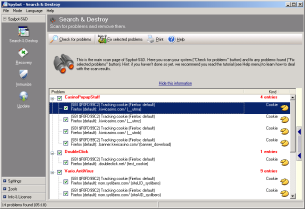
Spybot - Search & Destroy detects and removes spyware, a relatively new kind of threat not yet covered by common anti-virus applications. Spyware silently tracks your surfing behaviour to create a marketing profile for you that is transmitted without your knowledge to the compilers and sold to advertising companies. If you see new toolbars in your Internet Explorer that you haven't intentionally installed, if your browser crashes inexplicably, or if your home page has been "hijacked" (or changed without your knowledge), your computer is most probably infected with spyware. Even if you don't see the symptoms, your computer may be infected, because more and more spyware is emerging. Spybot-S&D is free, so there's no harm giving it a try to see if something has invaded your computer.
To see a list of threats Spybot-S&D can remove, visit Threats. For an introduction to Spybot-S&D, please read the tutorial. If you fear incompatibility with other software you are now using, although we can assure you that there is no danger you can review compatibility overview which lists some software whose compatibility has been analyzed.
Spybot-S&D can also clean usage tracks, an interesting function if you share your computer with other users and don't want them to see what you have been working on. And for professional users, Spybot-S&D allows you to fix some registry inconsistencies and extended reports.
Features:
Removal of adware and spyware Removal of dialers Removal of keyloggers Removal of trojans and other baddies Removal of usage tracks
Permanent blocking of threatening ActiveX downloads Permanent blocking of known tracking cookies for IE Permanent blocking of threating downloads in IE
Detailed information about problems found
Strict criteria to define targets
Integrated update function Weekly updates Update notification by mail
User-extendable database Save removal of threats by shredding them Backups of every removed problem Exclude option to ignore specific problems Command line parameters to automate tasks Number of targets Number of detection files and entries
You may download Spybot - Search & Destroy 1.6.0 from official download link
Read the rest of this entry »»»
chiCkie.exe Virus Remover
The virus chickie is a worm for Windows which appeared at the beginning of the year 2007.
Its visible function is that the “search” and “run” commands disappear from start menu and these commands do not works even by the shortcuts (F3 and Ctrl+R), the folder option is not more available, the administration of the restoration of the system is deactivated. It also disable certain programs of administration like the task manager, msconfig, cmd, regedit...
It is transmitted by the removable supports..
This virus creates a file in the Windows directory
Windows\chiCkie.exe
Also Creates these three files in all removable disk:
1_Saves.exe
1_Saves_Fichiers.exe
Administrateur_Fichiers.exe
Creates the following registry entries::
HKLM\SOFTWARE\Microsoft\Windows\CurrentVersion\Run
chiCkie
(Windows)\chiCkie.exe HKCU\SOFTWARE\Microsoft\Windows\CurrentVersion\Run
I just want to say I love Milko and I need a drink
(application)\svchost.exe WARNING:
This virus launches out automatically to each time you open or explore any USB device. After downloading the patch, Restart your computer in safe mode. Attach the infected Usb devices but do not open them. Now run the patch to remove the virus from your computer and USB devices
Instruction on how to restart your computer in safe mode.
http://www.net-studio.org/tutoriel/safe-mode.php
You may download this patch from Net-Studio.
Read the rest of this entry »»»
USB Firewall
Now a days usb devices are common.usb flash drives, Card reader, hard drives and so on to make our life easy.
But they have a negative side also which is spreading Viruses. All over the world (specially in pakistan and india) usb devices are the source of spreading viruses. Even antivirus softwares are unable to stop and remove them (e.g Symantec).
These virus are real headache.They disable Task Manger, Folder Options, Regedit, run command etc. So there is a need for such type of software which can stop these.
So I brought a software for you. USB FireWall blocks
USB FireWall doesn’t need any virus definition update. USB FireWall can also clean your hard disk partition from auto launched application.
USB FireWall is an application which protects you from all malevolent programs which try to launch itself as soon as a peripheral USB is inserted. It will inform you if ever a such program exists in your USB peripherals. You can remove the malevolent file and the file autorun.inf which launches it with just one click.
Download link and more info is available at USB Firewall official website: http://net-studio.org/application/usb_firewall.php
Read the rest of this entry »»»